How to develop an app for your business: from whether you need one to maintenance after launch
The stages of developing a business app: discovery, flows, design, build, testing, App Store and Google Play, privacy, code ownership, and what to ask a studio.
You develop an app for your business in eight stages: discovery (who uses it, what they do, what the business gains), user flows and a clickable prototype, design and a design system, development of the front end, back end, admin system and integrations, testing, store submission if you need the stores, launch, and ongoing maintenance. A focused first version for a business usually takes somewhere between two and six months, depending on scope.
Before the first stage comes the question that saves the most money: does the business need an app at all, and if so, which kind. Much of what businesses ask for as “an app” is really a booking system, a client area or a tool for the team, and those do not always have to go through Apple’s and Google’s stores. This guide covers that decision, the kinds of business apps, every stage of the process and what you should hold at the end of it, the stores, privacy and ownership, and what to ask whoever builds it. We are a studio in Israel, so the examples come from the market we work in, but the process is the same anywhere.
Does your business need an app at all?
An app earns its place when people have a reason to come back to it again and again: to book, to order, to check their history, to collect rewards, to do their job. If a customer deals with you once a year, a good website with a form will do the work, and nobody installs an app for a single action. If your team runs its work across spreadsheets and group chats, the real need is usually an internal system rather than an app in a store.
Even when you do need an app, it comes in three main forms: a native app installed from the store, a web app (including a PWA) that opens from a link and can be added to the home screen, and a Telegram mini app, which, according to Telegram’s documentation, is built in JavaScript, launches inside Telegram and can take payments. The differences in cost, time, access to phone hardware and notifications are laid out in our comparison of native apps and web apps. The short rule: if you do not need something only native can do, start on the web.
- Yes, an app: customers return often, there is a repeated action (a booking, an order, a subscription), and there is value in a timely notification or in using the camera, location or phone payments.
- Probably an admin system: the problem sits with your team, not your customers. Bookings, calendar, stock and customer records are spread across several tools.
- Probably a website or landing page: the goal is to explain, to be found in search and to get enquiries. Our guide to building a business website is the better starting point.
- Probably off-the-shelf software: the process is entirely standard and an existing product already does it well. Not every need justifies a build.

What kinds of business apps are there?
When people say “an app for the business” they mean one of four things, and often two of them together. Name which one in your brief, because each is built and tested differently.
A customer app
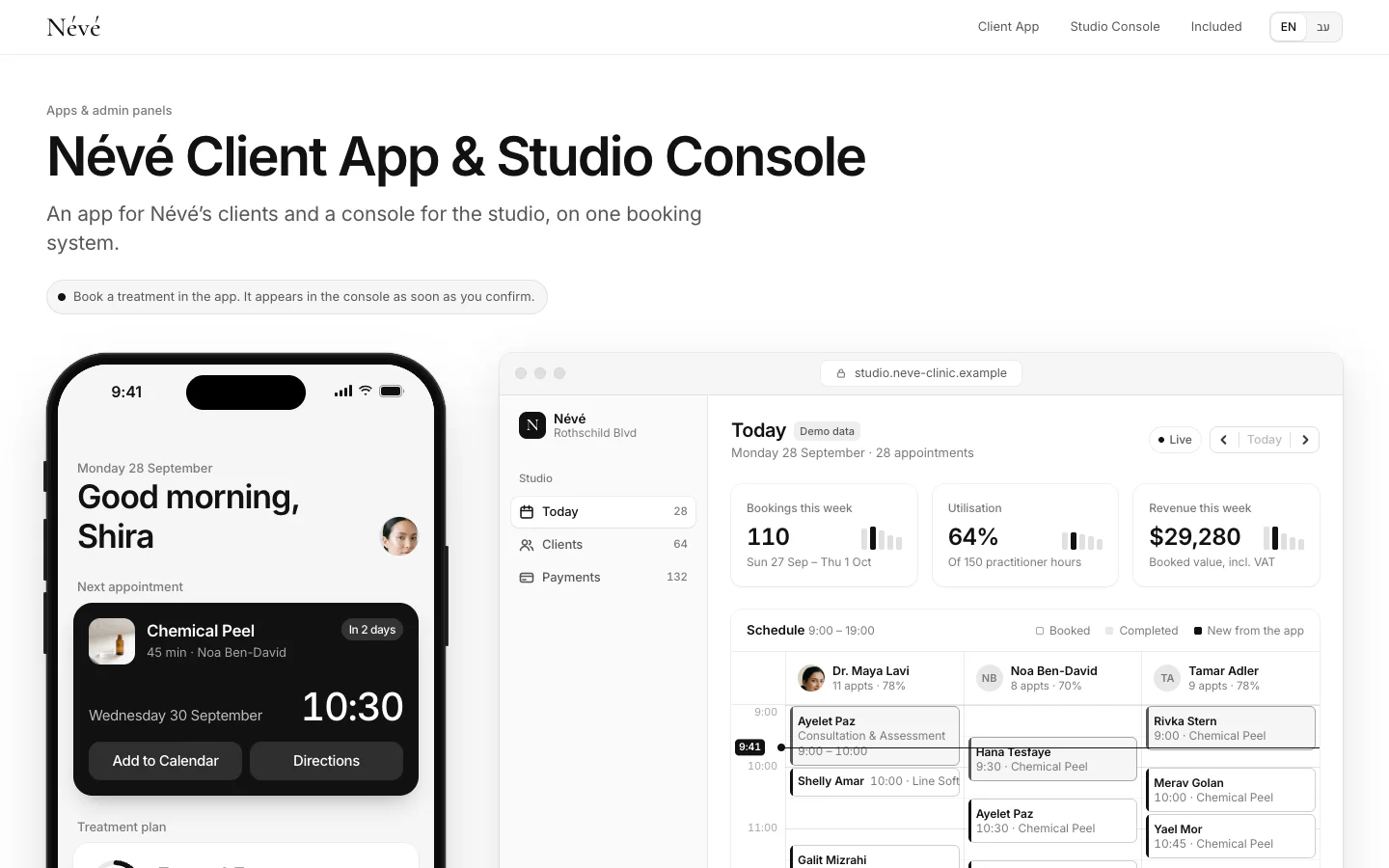
What your customer holds in their phone: booking, ordering, paying, history, a loyalty club, messages. It has to be very simple, work on any phone and look like the brand. One we built is the Névé clinic app: clients book treatments and see their history, and the team sees the same data in its own console. It is a concept, and the clinic is fictional.
An internal app for staff
A tool for people in the field or in the office: tasks, reports, checklists, stock, shift schedules. Here design competes less for attention and speed and reliability matter more. An internal app does not need a public store; a web app behind a secure login is usually enough.
An admin system or dashboard
The screen where the business runs itself: customers, orders, calendar, stock, reports and permissions. Almost every customer app needs one behind it, and sometimes the system is the whole product. An example is the CRM for the ALBA residential project, where leads, sales-gallery appointments and apartments are managed in one place (a concept; the project is fictional). We cover building these, and when to build versus buy, in our guide to custom admin systems, and the choice between an off-the-shelf and a custom CRM in our guide to CRM for small business.
A SaaS platform
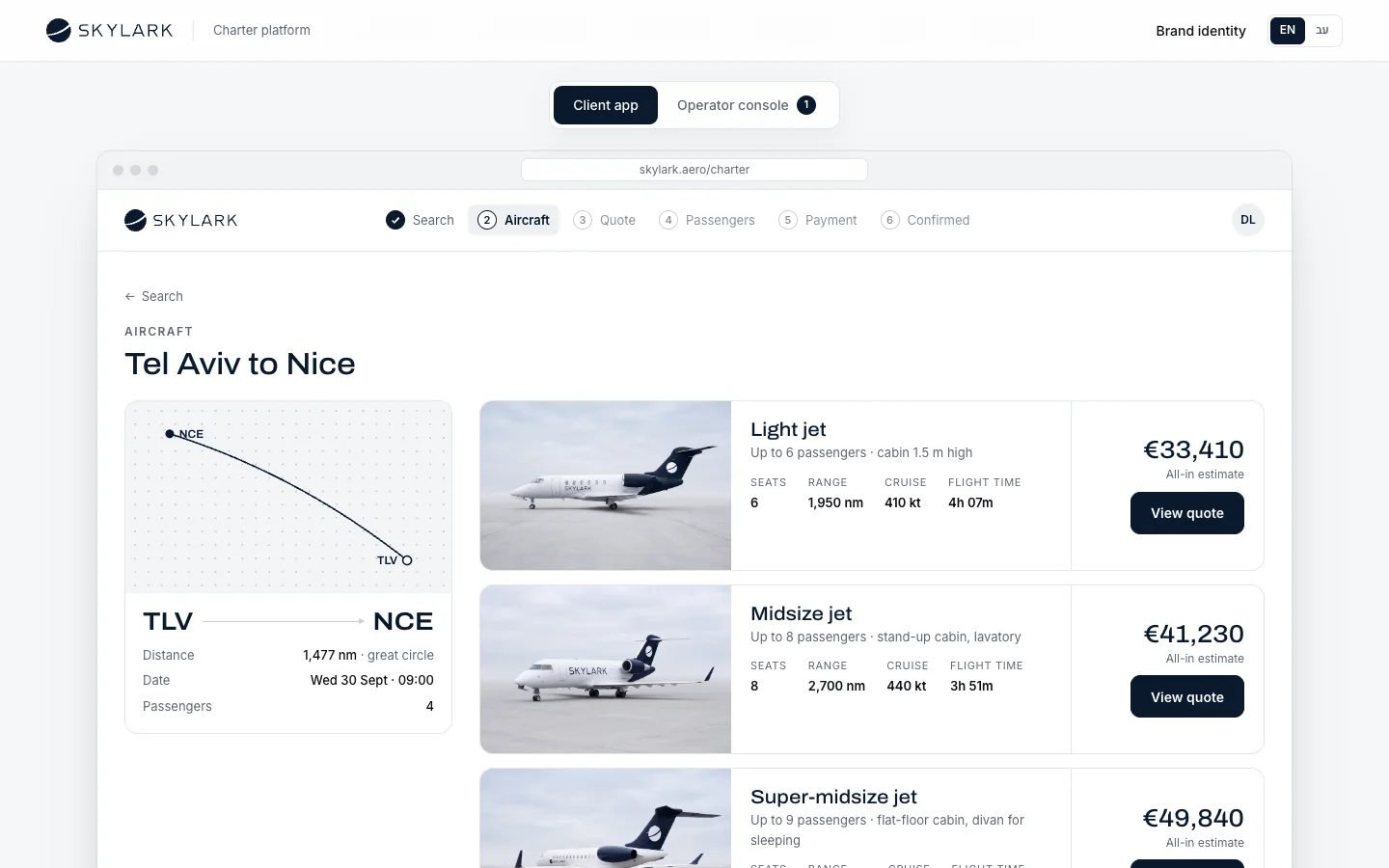
When the app itself is the product, sold to many customers, each with their own account, users and data. This is the most complex case: separating customers’ data, subscriptions and billing, permissions, and far more testing. The SKYLARK booking platform, for a fictional private-aviation operator, shows the shape: clients book a flight in minutes, and the operator runs aircraft, crews and quotes in the same system.
The app development process, stage by stage
The table summarises the process. The durations are ranges we see on projects for small and mid-sized businesses in Israel, not a commitment: they depend on the number of screens, the kinds of users, the number of integrations with other systems, and how quickly decisions are made on your side. Some stages overlap.
| Stage | What happens | What you receive | Typical duration |
|---|---|---|---|
| Discovery and requirements | Talking to the people who will use it, mapping the current process, roles and permissions, deciding what goes into version one | A specification, a list of screens, a list of integrations, a proposal with a price and a date | Roughly 1–3 weeks |
| User flows and prototype | Every user path from entry to finish, black-and-white screens, a clickable prototype | Flow diagrams, wireframes, a prototype you can try on your phone | Roughly 2–4 weeks |
| Design and design system | A visual language from the brand, every screen and state designed, reusable components | Design files for every screen, a design system with colour, type and components | Roughly 2–6 weeks |
| Development | Front end, server and database, admin system, integrations with payments, calendar, CRM and messaging | Test builds updated every week or two, code in your own repository | Roughly 6–16 weeks for a first version |
| Testing | Tests on real devices, load, permissions, security, accessibility, your acceptance test | A closed list of issues, written sign-off | Roughly 1–3 weeks, partly alongside development |
| Store submission | Developer accounts, listings, screenshots, privacy policy, submission for review | An approved app on the App Store and Google Play (native only) | From a few days to a few weeks |
| Launch | Deploying to production, migrating data, training staff, close monitoring | A live system, a short staff guide, fixes in the first weeks | One to two weeks of close support |
| Maintenance and updates | OS and library updates, security, backups, fixes and new features | A maintenance agreement with response times, scheduled releases | Ongoing, for as long as the app lives |
1. Discovery and requirements
Discovery answers three questions: who uses the app, what they do in it, and what the business gains when it works. Write down every kind of user (customer, employee, manager, sometimes a supplier), what each may see and change, and which existing systems the app must talk to: payments, calendar, CRM, accounting, WhatsApp, email. Name every integration, because each one is work and each one is a point that can break.
Discovery is also where you decide what does not go into the first version. That decision moves the price and the timeline more than any other. If you are not sure how to put all this into words, our guide to briefing a studio helps you organise it before you approach anyone.
2. User flows and prototype
Before anything is designed, the paths are drawn: how a customer signs in for the first time, how they book, what happens when there is no slot, how they cancel, what the team sees at that moment. From the flows come simple black-and-white screens and a prototype you can tap through on a phone. This is the cheapest place to find mistakes: a change to a wireframe takes an hour, the same change in code can take a week.
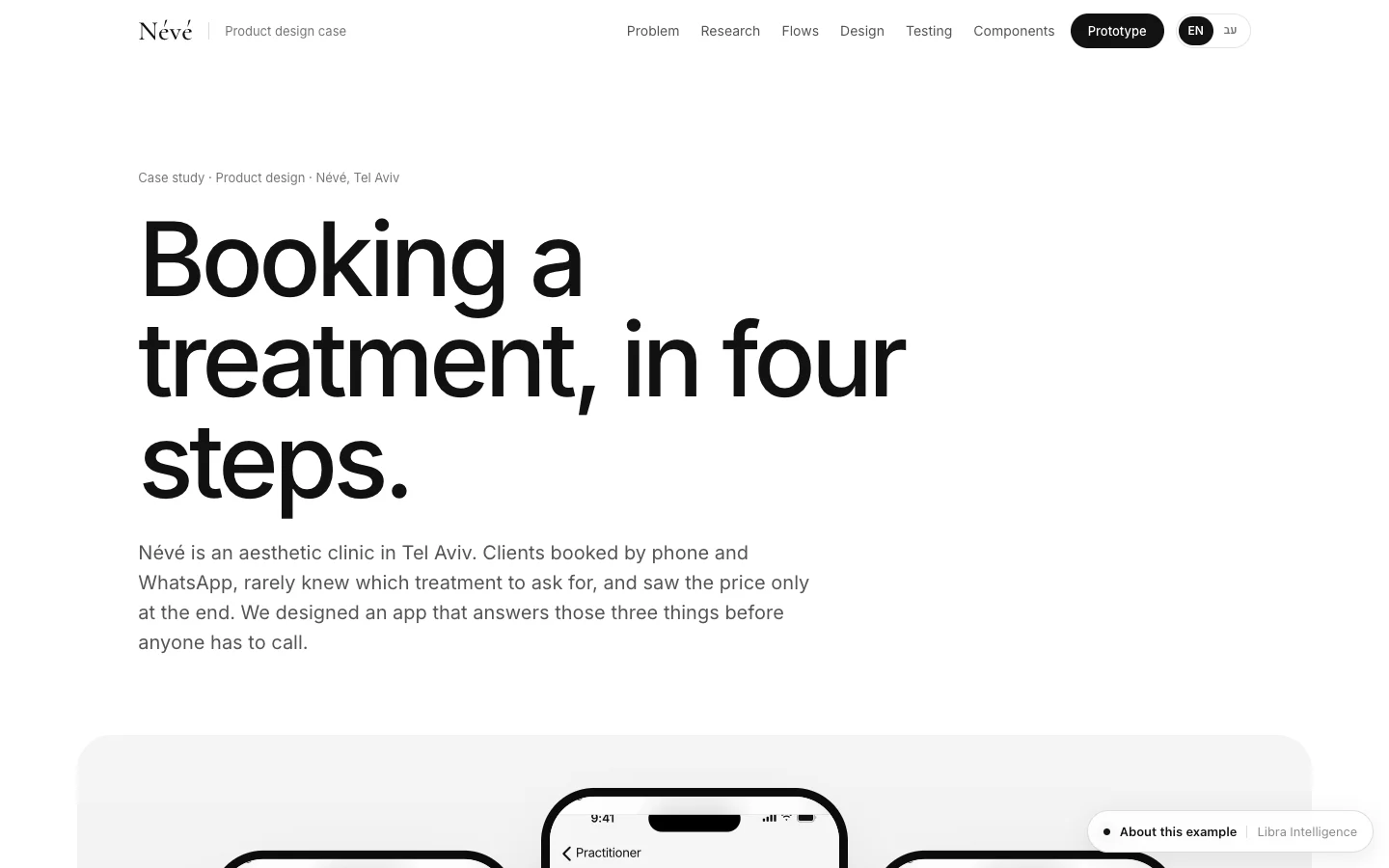
You can see the research, flows and wireframes in the Névé product design case, which shows how the fictional clinic’s app was designed, what was tested and what changed afterwards.
3. Design and a design system
Design takes the approved screens and gives them the brand’s language: colour, type, icons, imagery, motion. Design the states nobody shows in a pitch as well: the empty screen, loading, errors, no connection, the success message. An app that only looks right when everything goes well will look broken on day one.
For an app that will grow, build a design system: a library of colours, spacing, buttons, fields and cards, with usage rules, that designers and developers both work from. It saves time on every new screen and keeps things consistent when new people join the project. The SKYLARK design system is an example, with live components, code and usage rules.
4. Development: front end, back end, admin and integrations
Development splits into four parts, and the proposal should itemise each:
- Front end: the screens the customer or employee sees, on the web, native or both. Languages and right-to-left layouts, accessibility and speed belong here too.
- Back end: where data is stored, who may access what, sign-in and authentication, backups and logs.
- Admin system: the console where your team manages customers, orders and content without calling a developer. Without it, every small change becomes a support request.
- Integrations: payments, calendar, CRM, accounting, SMS, email and WhatsApp. Some need a subscription to an outside service, and some depend on the other vendor granting access.
Good work at this stage looks like test builds every week or two that you can open on your phone and comment on, not three quiet months and then a surprise. Ask for the code to live from day one in a repository that sits in your own account.
Once the app connects to automated processes, such as a WhatsApp reminder the day before an appointment or a lead updated in the CRM, it is already touching automation. What is worth automating in a business and what is not is covered in our guide to business automation.
5. Testing
Test on real devices, not only simulators: an older iPhone and a cheap Android, small and large screens, a slow connection. Test permissions (an employee does not see what only a manager sees), edge cases (two people booking the same slot in the same second), basic security and accessibility. At the end comes the acceptance test: you go through the scenarios agreed in discovery and sign off in writing. Without that step there is no agreed way to know the work is finished.
6. Store submission
Only relevant to a native app. You need developer accounts with Apple and Google, a listing, screenshots, a privacy policy and contact details, and then you submit for review. The costs and rules are below.
7. Launch
Launch covers deploying to production, migrating existing data (customer lists, products, history), a short training session for staff, and a period of close monitoring in which whatever comes up is fixed quickly. Launch quietly to a small group before announcing it to all your customers, and decide in advance who on your side handles the questions of the first days.
Decide before launch what you will measure in the first month. Not downloads, but the action the app was built for: how many bookings came through it, how many orders arrived without a phone call, how much typing the team no longer does, and where users get stuck and leave. Those numbers, together with the questions reaching your staff, decide what goes into the next version, not the list of ideas from the first meeting.
8. Maintenance and updates
An app does not end at launch. Apple and Google update their operating systems every year, code libraries get security patches, and outside services change their interfaces. An app nobody maintains starts breaking quietly. Ask for a maintenance agreement that states what is included, the response time for a fault, who runs backups, and how a new feature is priced.
Start small: a first version, not everything at once
The most common mistake in building an app for a business is trying to put everything that came up in the first meeting into version one. Every feature adds screens, tests, maintenance and points of failure, and until the app meets real users there is no way to know which of them will actually be used. A good first version does one or two things end to end, very well, with an admin system that lets the team work with it.
- Write every idea down in one list.
- Mark the one action without which the app has no reason to exist (for example, booking).
- Add only what that action needs to work: sign-in, payment if there is one, a notification, and an admin screen for staff.
- Everything else moves to an “after launch” list, in order of priority.
- After a few weeks of real use, decide from what actually happened what goes into the next version.
How to define that first version and what to measure after it is the subject of our guide to building an MVP.
App Store and Google Play: accounts, fees and review
If you choose a native app, it goes through two stores, each with its own account, fee and rules. Open the accounts in the business’s name at the start of the project, because verification takes time.
- Apple: according to the Apple Developer Program enrolment page, the programme costs 99 USD per membership year (prices may vary by region). An organisation enrols as a legal entity with a D-U-N-S number, and the person enrolling must have the authority to bind it to legal agreements. Trade names and DBAs are not accepted.
- Google: according to the Play Console registration page, there is a one-time registration fee of 25 USD, and you can open a personal or an organisation account.
- Closed testing on personal accounts: a new personal developer account on Google Play must, under Google Play’s testing requirements, have at least 12 testers opted in continuously for 14 days before it can publish to everyone. One more reason to open an organisation account in the business’s name.
Both stores review every version before it goes live. Apple’s App Review Guidelines say in section 4.2 that an app should offer more than a repackaged website, so an app that is only a window onto an existing site may be rejected. Review times vary, so leave a few days of margin before a launch date and do not promise customers a date before the app is approved. A rejection is not a disaster: you fix what the reviewer points to and resubmit.

Privacy, personal data and account deletion
Almost every business app collects personal data: name, phone, email, order history, and sometimes sensitive data such as treatment details at a clinic. Privacy law applies wherever your users are (in Israel, the Protection of Privacy Law; in Europe, the GDPR), and the stores add requirements of their own. A few things belong in the plan from the start:
- A privacy policy: under section 5.1.1(i) of Apple’s guidelines, every app needs a link to its privacy policy both in its App Store listing and inside the app, explaining what data is collected, why, who it is shared with, how long it is kept and how to request deletion.
- Account deletion: Apple requires in section 5.1.1(v) that an app which lets people create an account also lets them delete it from within the app. Google requires, under Google Play’s account deletion policy, both an in-app path and a web link where users can request deletion of the account and its data.
- Data minimisation: collect only what the app actually needs. Every extra field is more data to store, secure and explain.
- Permissions and access: who on the team sees what, who can export a customer list, and where access is logged.
- Where the data lives: which cloud provider, which region, and who holds access to that account.
If the app handles medical or financial data or data about minors, get legal advice on the specific obligations before development, not after. This guide does not replace that advice.
Who owns the code, the accounts and the data
This is the part businesses find out about last. An app is an asset, and you should confirm in writing that it is yours:
- The code lives in a repository (on GitHub, for example) in the business’s account, and you hold the highest permission on it.
- The Apple and Google developer accounts are in the business’s name, not the vendor’s. Moving an app between accounts is possible but awkward.
- The cloud account, domain, email service and messaging services are registered to you, and you either pay for them directly or have full access.
- The contract states that rights to the code and design files pass to you on final payment, and lists third-party components and licences.
- There is basic documentation: how to run the system, how to release a version, and which outside services it relies on, so another developer could take over.
A serious vendor will not object to any of these. For us it is simple: we write the code, and the system is yours.
Common mistakes when developing a business app
Most projects that go wrong do not stall on code. They stall on decisions made too early or too late. These are the mistakes we see most often when businesses come to us after a previous attempt:
- Starting with the design: polished screens before anyone agreed what each user does. The screens get redesigned because the process changed.
- Forgetting the team: a customer app with no admin system, while staff keep a spreadsheet on the side. A month later the data no longer matches.
- Building everything at once: twenty features in version one, a launch that keeps slipping, and users who touch three of them.
- Skipping the acceptance test: no agreed list of scenarios, so no agreement on when the work is done or what counts as a fault.
- Leaving accounts with the vendor: store, cloud and repository accounts in the builder’s name, so any move to another vendor becomes a negotiation.
- Not budgeting for year two: the app goes live and nobody plans for the updates Apple, Google and outside services will require.
How much it costs and how long it takes
Price is set by the number of screens, the number of user types, the number of integrations, native or web, and whether a full admin system is needed. The gap between a focused web app and a native app in both stores with an admin system and integrations can be very large, so any price given without discovery is a guess. We lay out ranges, what goes into them and what costs money every year in our article on how much app development costs.
As for time: going by the table above, a focused first version usually takes between two and six months from the start of discovery to launch. What stretches projects in practice is rarely the code; it is decisions that wait, content that does not arrive, and an outside vendor that takes a while to grant access.
An example: a booking app for a clinic
To see how the stages play out on one project, take an aesthetic clinic. The core need: clients book and move appointments themselves, get a reminder, and see their treatment history. Staff need one calendar, a client record and a way to block time.
- Discovery: three kinds of user (client, practitioner, manager), treatment types and their lengths, connections to payments and messaging.
- First version: booking and cancelling, a reminder, the client record and a staff calendar. A loyalty club and a product shop wait for the next version.
- Form: a web app that opens from a link in a message, with nothing to install. A native app later, if use justifies it.
- Privacy: treatment data is sensitive, so strict permissions, minimal data, and deletion on request.
That is exactly what the Névé example shows, and we go into this case in depth in our guide to booking apps for clinics.
How to choose an app developer or studio, and what to ask
A good-looking portfolio is not enough. Ask to open apps and systems the vendor has built, on your phone, and try them. Then ask every vendor the same questions, so you are comparing like with like:
- What discovery includes, and whether you receive a specification and a list of screens before committing to the whole project.
- Whether there is a clickable prototype before development.
- Native, web or both, and why that choice for your business.
- Which integrations are included, by name, and what happens if an outside vendor changes something.
- Whether the admin system is included, and what your team can change in it without a developer.
- How often you will get a test build, and what the acceptance test looks like.
- Who owns the code, the repository, the store accounts and the cloud account.
- What maintenance includes, the response time for a fault, and what year two costs.
- Who actually writes the code: the vendor’s own team or a subcontractor.
- A schedule with dates, and what happens if decisions or content are late on your side.
Signs to stop: a final price with no discovery, accounts opened in the vendor’s name “for convenience”, a promised number of downloads, or a refusal to show live systems.
A good business app does one thing people come back to, and it is yours: the code, the accounts and the data.
What Libra builds here
At Libra we develop web apps and Telegram mini apps, admin systems and booking panels, internal tools for teams and the connections between them, designed to look like the brand because the same studio produces the visual language. The details are on our apps and business systems page, and the examples mentioned here are concepts we built with fictional businesses.
To get a direction and a price for your app, send a brief with who will use it, the main action, and the systems you already have. We reply by email with a direction, a written price and a date.
No term matches.
More on Apps & systems
- Native app vs web app: when a business really needs an app, and when a website or PWA is enough ComparisonResponsive website, installable web app (PWA), cross-platform or fully native: a comparison table, store fees, web push on iPhone, and when an app is worth it.
- App development cost: realistic ranges, what drives them and what you pay every yearWhat an app costs to build: web app, app with admin system, native, platform and MVP ranges, the cost drivers, yearly running costs, and how to read a quote.
- How to build an MVP: choosing the one flow, leaving the rest out, and measuring what you learnWhat an MVP is and is not, choosing one core flow, what to leave out, no-code or code, realistic timelines, what to measure after launch, and a scope worksheet.
- Custom admin dashboard: when to build one, what goes in it, and how to write the requirementsWhen to build a custom admin system and when off-the-shelf is enough: modules, roles and permissions, data ownership, security, and a requirements checklist.
- Booking app for clinics: the scheduling logic, reminders, deposits and patient privacyHow to build online booking for a clinic: web or app, scheduling by practitioner, room and duration, WhatsApp reminders and consent, deposits, patient data, and a checklist.
A short picker
What fits you?
What is closest to what you need?
Where are you now?
Questions
What are the stages of developing an app for a business?
Discovery and requirements, user flows and a prototype, design and a design system, development (front end, back end, admin system and integrations), testing, store submission for a native app, launch, and ongoing maintenance.
How long does it take to develop a business app?
A focused first version usually takes between two and six months from the start of discovery to launch. It depends on the number of screens, user types and integrations, and on how quickly decisions are made.
Does every business need an app?
No. An app is worth it when customers or staff return to it often for the same action. If the need is to be found and get enquiries, a website is better; if the problem is internal, an admin system usually is.
How much does it cost to publish on the App Store and Google Play?
The Apple Developer Program costs 99 USD per year, and Google Play Console charges a one-time 25 USD registration fee. Web apps and Telegram mini apps need neither account.
Does my app have to let users delete their account?
If it lets them create one, yes. Apple requires deletion from within the app, and Google requires both an in-app path and a web link for requesting deletion of the account and its data.
Who owns the code of an app a studio builds?
Whoever the contract says, so confirm in writing that the code, repository, store accounts and cloud account are in the business’s name and pass to you on final payment.
Should I build a native app or a web app first?
For most businesses, a web app first: it is faster to ship, needs no store review, and one version runs everywhere. Go native when you need hardware access, rich notifications or a store presence your customers expect.
Getting started
Want this for your business?
Send a short brief: three required questions, the rest only if you like. We reply by email with a direction, a written price and a date.