App development cost: realistic ranges, what drives them and what you pay every year
What an app costs to build: web app, app with admin system, native, platform and MVP ranges, the cost drivers, yearly running costs, and how to read a quote.
Part of the guide: How to develop an app for your business: from whether you need one to maintenance after launch

A business app typically costs roughly $8,000–$22,000 for a focused web app, roughly $22,000–$55,000 for an app with an admin system and integrations, and roughly $40,000–$110,000 or more for a native app in the Apple and Google stores or a platform serving several kinds of users. The price follows the number of screens and flows, user roles, integrations, payments and platforms, and on top of it come yearly costs for hosting, maintenance and OS updates.
These are rough USD conversions of the ranges we see in our own market, Israel, where Libra is based; agencies in the US, UK or Western Europe often quote considerably more for the same scope. Treat them as proportions, not a price list: two apps that look alike on screen can differ threefold in price because of what happens behind the screens. The process itself, from discovery to maintenance, is in our guide to developing an app for your business. This article is about the money: what each range buys, what raises it, what recurs every year and how to compare quotes.
How much does it cost to build an app?
The table gives an order of magnitude by type of project, to have before you ask for quotes. It does not replace discovery.
| Type of project | Rough range (USD) | What it usually includes |
|---|---|---|
| MVP: a focused first version | Roughly $8,000–$33,000 | One core action end to end, sign-in, a basic admin screen, one or two integrations. |
| Web app or Telegram mini app | Roughly $8,000–$22,000 | Up to about 15 screens, one or two user types, a payment or booking, notifications. |
| App with admin system and integrations | Roughly $22,000–$55,000 | A customer app, a staff panel with permissions, payments, calendar, CRM and WhatsApp connections. |
| Native app on iOS and Android | Roughly $40,000–$110,000+ | Two store builds (or one cross-platform codebase), an admin system, store submission, testing on many devices. |
| Marketplace or SaaS platform | From roughly $70,000, often far more | Several user types, data separated per customer, subscriptions and billing, reporting, load. |
| Yearly running costs | From a few thousand to tens of thousands a year | Hosting and cloud services, developer accounts, maintenance, OS updates, fixes and improvements. |
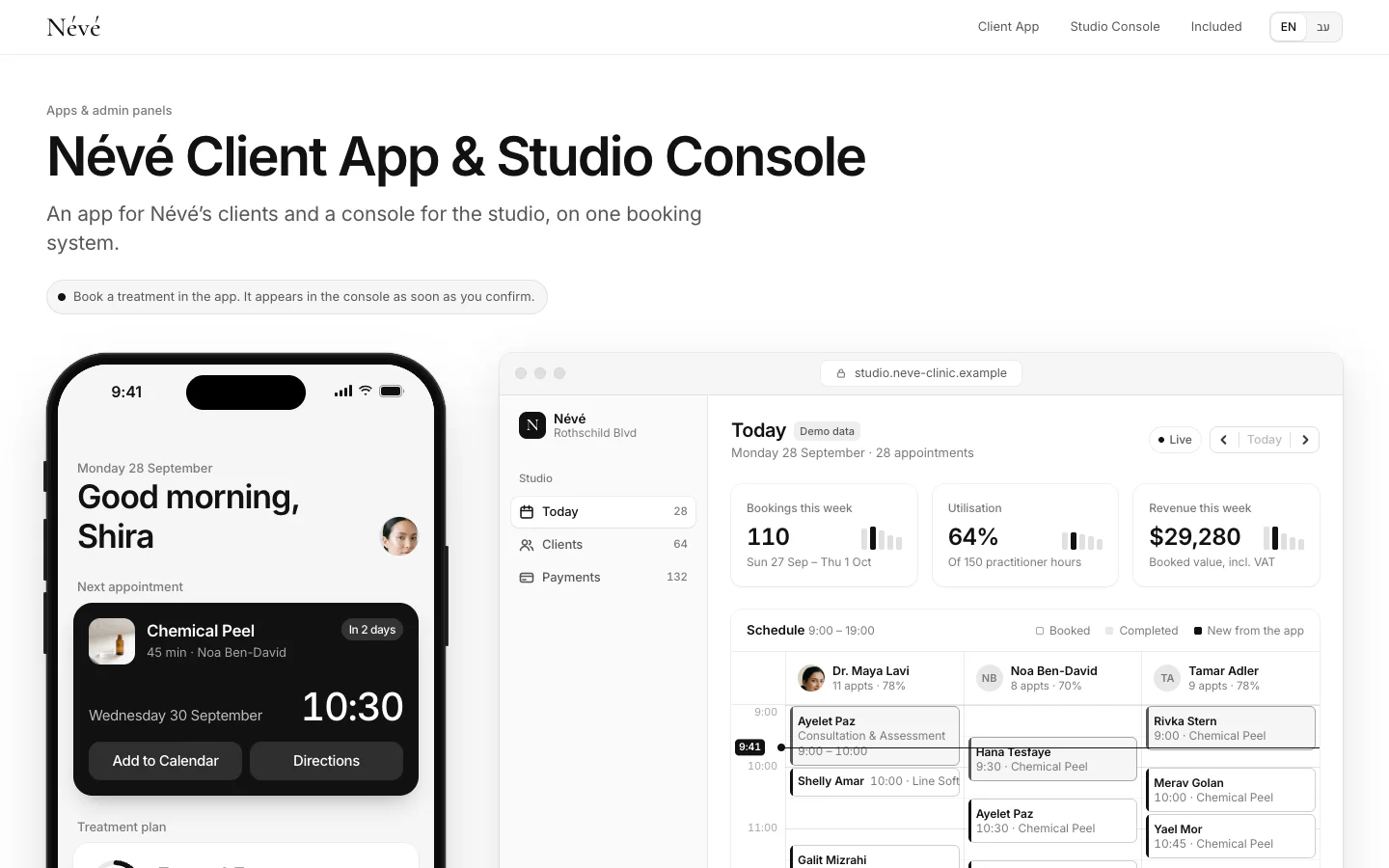
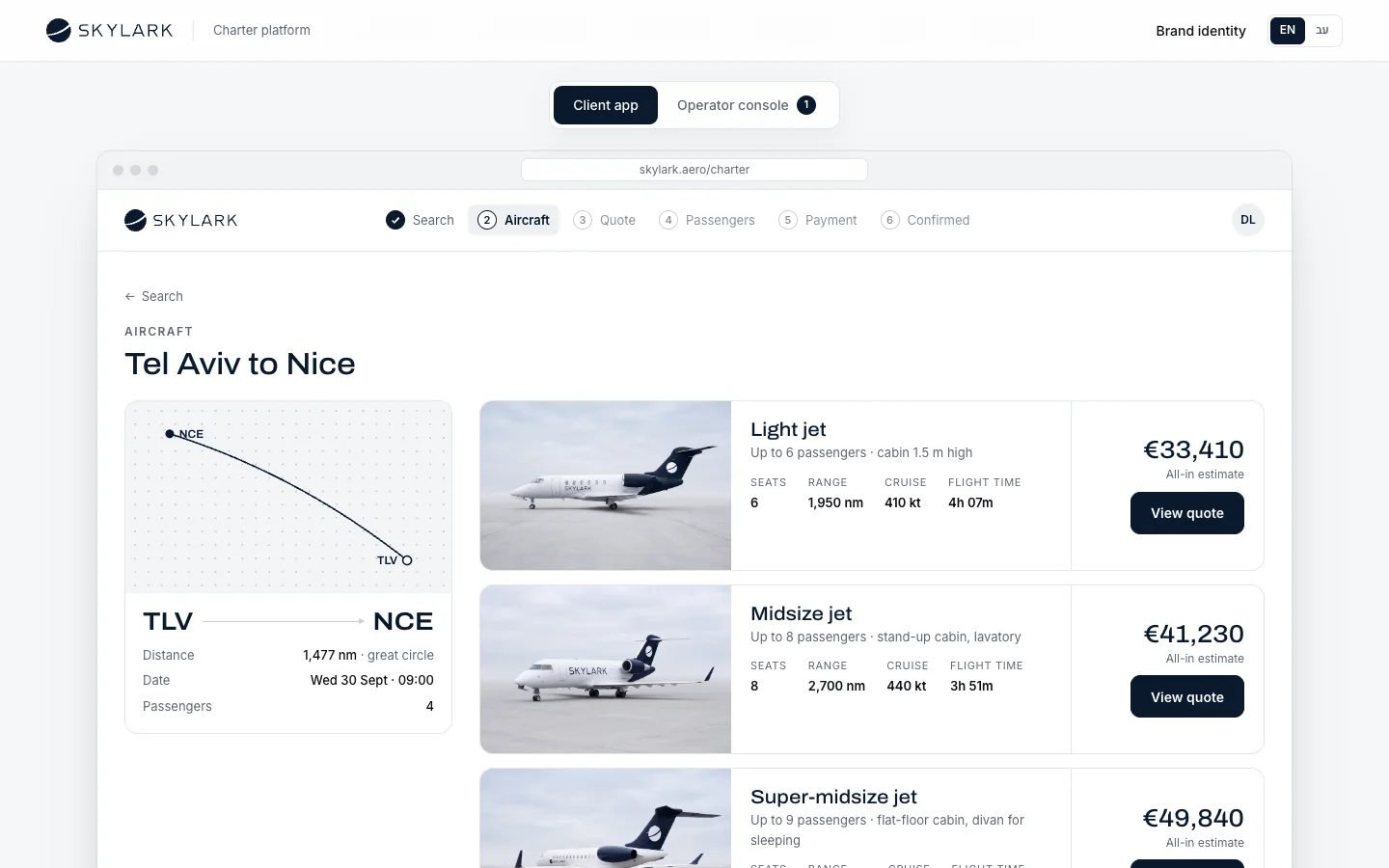
To make that concrete: the Névé clinic app is a customer app with a console for staff, the third row of the table. The SKYLARK platform for booking private flights, where clients book and the operator runs aircraft, crews and quotes, sits closer to the platform row. Both are concepts we built to show the work, and the businesses in them are fictional.
What drives the cost of an app
Almost the whole gap between a $14,000 quote and a $70,000 one comes from nine variables. Go through them before asking for quotes, because each one is a decision you can make.
Screens and flows
Not the number of screens alone but the number of distinct flows: sign-up, booking, payment, cancellation, history. Each flow also carries the states nobody shows in a pitch: the empty screen, an error, no connection, no free slots. A flow that looks like three screens is often ten.
User roles and permissions
An app with only a customer costs far less than one with a customer, a practitioner, a manager and a supplier. Every role adds its own screens, rules about what it may see and change, and tests that prove those rules hold.
Integrations
Payments, calendar, CRM, accounting, WhatsApp, SMS and email. Each integration is development, testing and sometimes a subscription to an outside service, and it depends on the other vendor too: some systems have a clean API, others need workarounds. A good quote names every integration.
Payments
A one-off payment through a hosted payment page is the simple case. Instalments, recurring subscriptions, deposits, refunds and automatic invoices add work and testing, and the choice of payment provider matters; we cover the providers in the market we work in in payment gateways in Israel.
Real-time and offline
Chat, courier tracking, a board updated by several people at once, or an app that works in the field without signal and syncs later. These requirements multiply the complexity of the back end, so ask whether version one really needs them.
Platforms: web, native or both
A web app is one codebase that runs everywhere. A native app in both stores means two submission tracks, testing on many more devices and sometimes two codebases. It is the biggest single jump in the table, which is why we treat it on its own in native app vs web app.
Design
Design on a ready component library saves time. Design built from the brand, with a design system every future screen relies on, takes more hours up front and saves them later. If there is no brand yet, that is a separate project worth pricing separately.
Back end and admin system
Nearly every app needs a second side: the place where staff manage customers, orders and content without calling a developer. Without one, every small change becomes a paid support request. What goes into one, and when to build rather than buy, is in our guide to custom admin dashboards.
Testing and QA
Tests on real devices, permission checks, edge cases and an acceptance test. In cheap quotes this is the first line to disappear, and then the testing happens on your customers.

How much does it cost to maintain an app every year?
The build is only the start. These are the costs that come back:
- Hosting and cloud services: server, database, file storage, backups and message delivery. For a small app this can be tens of dollars a month; for one with many users or video, much more.
- Store developer accounts (native only): the Apple Developer Program is 99 USD per membership year, and Google Play charges a one-time 25 USD registration fee.
- Store fees: these apply to digital sales inside the app, such as a content subscription. On Google Play, per its service fee page, most markets pay 15% on the first 1 million USD of yearly earnings and 30% above that. Payment for a service or physical product used outside the app, such as a treatment, a flight or a delivery, must be taken with ordinary payment methods under Apple’s guideline 3.1.3(e), so for most service businesses the store fee does not apply.
- OS updates: Apple and Google update their operating systems every year. Google, for example, requires new apps and updates to target a recent Android version, and an app that falls behind stops being available to new users on newer devices.
- Maintenance and fixes: library and security updates, changes in outside services, bugs. From what we see, a yearly budget of roughly 10–20% of the build cost is a reasonable planning figure, depending on the number of integrations and the pace of change.
- New features: after launch there is always a list. Budget for it separately from maintenance.
Fixed price or time and materials?
There are two main pricing models, and each has its place:
| Fixed price | Time and materials | |
|---|---|---|
| When it fits | The scope is known and specified: a closed list of screens, flows and integrations | The scope is still moving, or the product evolves from what users teach you |
| The benefit | Budget certainty and a written date | Freedom to change direction without negotiating every change |
| The risk | Every change becomes an extra; a vendor may cut corners to hold the price | The budget can grow without a ceiling if nobody tracks it |
| What to require | A detailed specification, a list of what is excluded, a price per change | An estimate per phase, a weekly hours report, a cap that needs approval |
Many projects combine the two: discovery and a prototype at a fixed price, then a fixed price for a first version that is now specified. That is how we work: after discovery you receive a proposal with the price and date in writing.
How to reduce app development cost without cutting quality
- Start with a focused first version. One core action that works end to end, the rest on an after-launch list. How to define it is in how to build an MVP.
- Start on the web. If you need nothing only native can do, a web app or a Telegram mini app saves the stores and the second codebase.
- Use what already exists. Connect the payment provider, calendar and CRM you have rather than rebuilding them.
- Approve the flow in a prototype. A change to a wireframe takes an hour; the same change in code can take a week.
- Decide quickly. Much of every budget overrun comes from waiting for decisions and content, not from the code.
- Do not cut testing or the admin system. Those are the savings that cost the most later.
How to read an app development quote
To compare quotes, ask every vendor to spell out the same items:
- The list of screens and flows, and what is left out of version one.
- The user roles and each one’s permissions.
- Web, native or both, and why.
- Every integration by name, and who pays for outside subscriptions.
- Whether the admin system is included, and what staff can change in it alone.
- How many design revision rounds, and whether there is a prototype before development.
- What the acceptance test looks like, and the warranty period for bugs.
- Who owns the code, the repository, the store accounts and the cloud account.
- What maintenance includes and what year two costs.
- A schedule with dates, and what happens if decisions are late on your side.
A final price without discovery is a guess, however precise it looks. If you are not sure how to describe the need, our guide to briefing a studio helps you put it in order first. And when something simpler will do, such as a site with a form, the comparison is in how much a business website costs.
A quote you can compare is one where every screen, every integration and every year appears by name.
What Libra builds here
At Libra we develop web apps and Telegram mini apps, booking and admin panels, internal systems and the connections between systems, designed in the brand’s language. The details are on our apps and business systems page. We write the code, and the system is yours.
For a price rather than a range, send a brief with who will use the app, the main action and the systems you already have. We reply by email with a direction, a written price and a date.
No term matches.
Questions
How much does it cost to build an app?
As rough conversions of the ranges we see in Israel, a focused web app costs roughly $8,000–$22,000, an app with an admin system and integrations roughly $22,000–$55,000, and a native app in both stores roughly $40,000–$110,000 or more. Agencies in the US and Western Europe usually quote more for the same scope.
How much does it cost to maintain an app per year?
From what we see, roughly 10–20% of the build cost per year, plus hosting and cloud services. It depends on the number of integrations, OS updates and how fast the app changes.
How much does it cost to publish on the App Store and Google Play?
The Apple Developer Program costs 99 USD per year and Google Play charges a one-time 25 USD registration fee. A web app or Telegram mini app needs neither.
Is a web app cheaper than a native app?
Usually, yes: one codebase, no store submission and no testing on two operating systems. The gap continues in yearly maintenance.
Do the app stores take a cut when customers pay for a service?
No. Under Apple’s guidelines, payment for services or physical goods consumed outside the app, such as an appointment or a delivery, uses ordinary payment methods rather than in-app purchase. Store fees apply to digital sales.
Fixed price or time and materials: which is better?
Fixed price suits a specified, closed scope; time and materials suits a product that is still changing. A common combination is discovery and a prototype first, then a fixed price for version one.
Why is app development so expensive?
Because most of the work is invisible on screen: the back end, permissions, integrations, error states, device testing and an admin system for staff. A focused first version is the main way to bring the price down.
Getting started
Want this for your business?
Send a short brief: three required questions, the rest only if you like. We reply by email with a direction, a written price and a date.