WordPress vs Webflow vs Shopify (and Wix, and custom code): which platform fits your business
An honest comparison of WordPress, Webflow, Shopify, Wix and custom-coded sites: hosting, pricing model, RTL, e-commerce, SEO, maintenance and ownership.
Part of the guide: How to build a business website, step by step

If your main goal is selling products online, Shopify is usually the simplest choice, because the store, hosting and checkout come together. For a design-led marketing site that your team edits without a developer, Webflow fits well, and WordPress is the choice when you need full flexibility, a lot of content and control over hosting and code. Wix suits a small business building on its own, and a custom-coded site makes sense when design, speed or the experience are part of the product itself.
No platform wins every case. Each one trades something for something else: convenience for control, a monthly subscription for maintenance, design freedom for dependence on a developer. Below are the practical differences, what matters if you publish in a right-to-left language or in more than one language, and how to choose without regretting it a year later. For the whole process of building a business website, from goals to launch, see our guide to building a business website; this article covers only the platform decision.
WordPress vs Webflow vs Shopify vs Wix vs custom code: comparison table
The table summarises the differences in principle. It does not replace checking your own requirements, but it puts the right questions in order.
| WordPress + WooCommerce | Webflow | Shopify | Wix | Custom code | |
|---|---|---|---|---|---|
| Best for | Content sites, complex sites, stores that need flexibility | Marketing and brand sites with precise design | Online stores | Small businesses building and running the site themselves | Sites where design and experience are the product |
| Pricing model | Software is free; you pay for hosting, theme, plugins and development | A site plan plus a workspace plan | Monthly subscription, plus an extra fee when using a third-party payment provider | Monthly or yearly subscription; a free plan exists | One-off development cost plus hosting |
| Hosting | Not included; you choose a host | Included in the site plan | Included in the plan | Included in the plan | Not included; you choose a host (often cheap for a static site) |
| Hebrew / RTL | Hebrew admin and RTL themes; depends on theme and plugins | Possible; must be planned in the design | Depends on the theme; the Horizon family supports it | Supported, with limits on bilingual sites | Full control, built in from the start |
| E-commerce | WooCommerce, very flexible | Separate e-commerce plans; suits a small catalogue | The core of the platform | On certain plans | Connect to a commerce platform or build it |
| SEO control | Full, with plugins | High, built into the interface | Good, with some URL-structure limits | Basic to good | Full |
| Design freedom | High with development, limited within a theme | Very high without code | Within the theme’s structure | Moderate | Complete |
| Maintenance burden | High: core, plugin and security updates | Low | Low, but apps accumulate | Low | Low for a static site; changes need a developer |
| Ownership / portability | Full: open source, your files and data | Partial: HTML and CSS export, not CMS content | Products export; the design stays | Low: the site lives inside Wix | Full, if the contract says so |
| Who can edit | Your team, in the admin | Your team, in the content editor | Your team, in the store admin | Your team, in the editor | Usually a developer, unless an editing layer is built |

WordPress: flexibility and control, with responsibility
WordPress is open-source software under the GPL, which means you can run it anywhere, change it and take it with you. That is its main advantage: the site, the files and the database are yours, and you choose the host. It has a large community, localised admin interfaces including Hebrew, and an enormous number of themes and plugins, which is why it remains a common choice for content sites, blogs and sites that need unusual features.
The price of that flexibility is responsibility. A WordPress site with twenty plugins is a system that needs constant updates, backups and security work, and every plugin is another thing that can break or slow the site down. Many slow WordPress sites are slow not because of WordPress but because of a heavy theme and plugins piled up over the years. What that maintenance involves and costs is covered in our website maintenance guide.
WooCommerce: a store on WordPress
WooCommerce is an open-source commerce plugin that runs on WordPress, and its makers stress that the site, code and data stay yours. It suits a store that needs specific local integrations, an unusual product structure or full control, and there are extensions for most payment and invoicing providers. The other side: a WooCommerce store is a WordPress site with all the maintenance that implies, and at high traffic it needs serious hosting.
Webflow: precise design without code
Webflow is a hosted platform: a visual editor that produces clean code, a content management system (CMS) and hosting, all under one account. Designers like it because almost any layout or animation can be built without writing code; marketing teams like it because editing copy and publishing pages does not need a developer. There are no plugins to update and no server to maintain.
Webflow’s pricing page splits plans in two: a site plan, which includes hosting, and a workspace plan for the team. Full translation and localisation is a paid add-on, and e-commerce has its own plans. On portability, the same page says you can export a site’s HTML and CSS but not its dynamic CMS content, so moving to another platform means moving that content separately. Right-to-left and bilingual sites work in Webflow, but they need to be designed that way from the first layout rather than flipped at the end; our guide to bilingual websites covers the details.
Shopify: a ready-made store, on the platform’s terms
Shopify is a hosted commerce platform. According to Shopify’s pricing page, hosting is included in the plan and you do not buy it separately, and when you take payments through a third-party provider rather than Shopify Payments an additional transaction fee may apply, lower on the higher plans. In practice you get products, inventory, orders, discounts and checkout without thinking about servers or updates.
If you sell in a right-to-left language, check the theme first: Shopify’s help centre says that the latest versions of themes in the Horizon family support right-to-left languages, and with another theme you need to confirm support before committing. Local payment providers and invoicing usually come through apps; for Israel specifically, see our guide to Shopify in Israel. The main limitation is that design and structure live inside the theme, and each extra feature is often an app with its own monthly fee. Over time that adds up.

Wix, briefly
Wix suits a small business that wants to build and run its own site in a simple editor. Hosting is included in every plan, and there is a free plan. For bilingual sites mixing right-to-left and left-to-right languages there are limits: Wix’s help centre notes that in some apps, such as Stores, the writing direction applies to all languages. The main drawback is portability: the site does not leave Wix, and moving platform means rebuilding.
A custom-coded site: when it is the right call
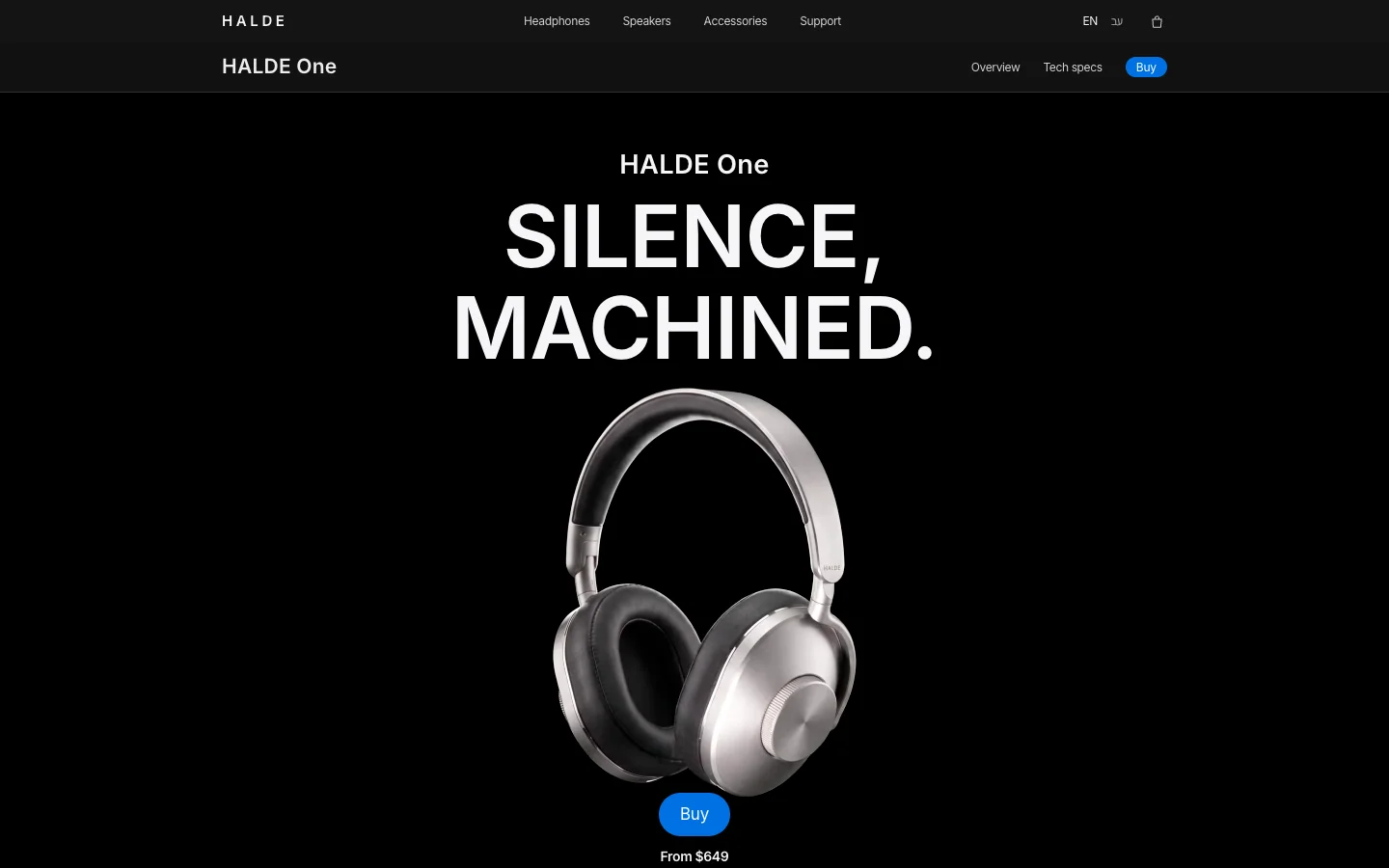
A custom-coded site is written for the business, with no off-the-shelf CMS underneath. This is how our own demos are built: the OVELLE jewellery store, with collection pages, a shopping bag and a ring in 3D; the HALDE One headphones launch page, with a film, cinematic scrolling and an interactive dial; and the Névé clinic website. They are concepts we built to show the work; the businesses are fictional.
The advantages: full control over design and speed, no plugins to update, a static site that offers little of the attack surface a CMS does, and cheap hosting. The drawbacks: structural changes go through a developer, and if your team updates content daily you need an editing layer or a headless CMS. For a large store, custom code usually means a designed front end connected to an existing commerce platform, not a commerce system written from scratch.

How to decide: a checklist
Before choosing, answer these questions in writing. The answers usually narrow the field to one or two options:
- What must the site do? Sell products, take enquiries, publish content or present a brand. A store with many products points to Shopify or WooCommerce.
- Who will update it, and how often? A team that publishes weekly needs a comfortable editor. A site that changes once a quarter can go through a developer.
- How much does design matter? If your brand is judged on how it looks, a stock theme will hold you back.
- Which languages? Test right-to-left in the actual theme, and on a bilingual site test both languages on the same screen.
- Who owns maintenance? If nobody will keep WordPress updated, a hosted platform is safer.
- What does it cost over three years? Subscription, apps, plugins, hosting and maintenance, not only the build. Build ranges are in our article on how much a business website costs.
- What happens if you leave? Can you export content, products and customers, and who holds the domain.
- What must it connect to? Payments, invoicing, CRM, calendar, inventory. Check that a real integration exists, not a promise.

Migrating between platforms: what to plan
A platform migration is a project of its own, and often a chance to rebuild what did not work. Plan these in advance:
- 301 redirects: every old URL should point to its new equivalent, or you lose what you built in search. Prepare a URL map before the move.
- Content: articles, pages and images. From Wix or the Webflow CMS the transfer is partial or manual, so count your content first.
- Products and customers: Shopify lets you export products to a CSV file, and WooCommerce has export too. Order history and customer accounts need separate checks.
- Payments and invoicing: a new connection, a real test transaction and a check that invoices come out right.
- Measurement: analytics, Search Console and ad pixels must move on launch day, not a week later.
- Accessibility: the new site must meet accessibility requirements from day one.
If you are opening a new store rather than just picking a platform, our guide to opening an online store walks through every stage, from products to shipping.

What we build
At Libra we build business websites, launch pages and online stores, in custom code and on existing platforms when that serves the business better, including brand design, copy and imagery. Details are on our websites, landing pages and stores page. We work mainly in Israel, in Hebrew and English. We do not recommend a platform before we know who will update the site, what it has to sell and what the three-year budget is.
For a recommendation and a price for your project, send a brief describing what the site must do and who will work with it. We reply by email with a direction, a written price and a delivery date.
No term matches.
Questions
Is Webflow better than WordPress?
Webflow is better when you want precise design, hosting included and no plugin maintenance. WordPress is better when you need full ownership of the code, unusual features or a very large amount of content, and have someone to maintain it.
Should I use Shopify or WordPress for an online store?
Shopify is simpler if you want to start selling quickly without technical maintenance. WordPress with WooCommerce suits stores that need full flexibility, specific integrations or control over hosting and code.
Can Webflow handle e-commerce?
Yes, Webflow has separate e-commerce plans, and it works well for a small catalogue with a strong design. For large catalogues, complex inventory or many integrations, a dedicated commerce platform is usually the better fit.
Does Shopify charge a fee on every sale?
According to Shopify’s pricing page, an additional transaction fee may apply when you use a third-party payment provider instead of Shopify Payments, and it depends on the plan. Your payment provider’s own processing fees come on top.
Can I move my site from Webflow or Wix to another platform later?
Webflow lets you export HTML and CSS but not dynamic CMS content; a Wix site cannot be exported as is. In both cases plan for moving content by hand and setting 301 redirects from every old URL.
When is a custom-coded website worth it?
When design, speed or the experience are part of what the business sells, and the site does not change every day. It needs no plugin updates, but structural changes go through a developer.
Getting started
Want this for your business?
Send a short brief: three required questions, the rest only if you like. We reply by email with a direction, a written price and a date.