A CRM for a real estate developer: what the system must know about a project
Why a generic CRM struggles with selling a residential project, and what works instead: unit inventory, lead sources, sales-office visits, reservations and a weekly report for the developer.
Part of the guide: How to market a new residential development, from pre-launch to handover
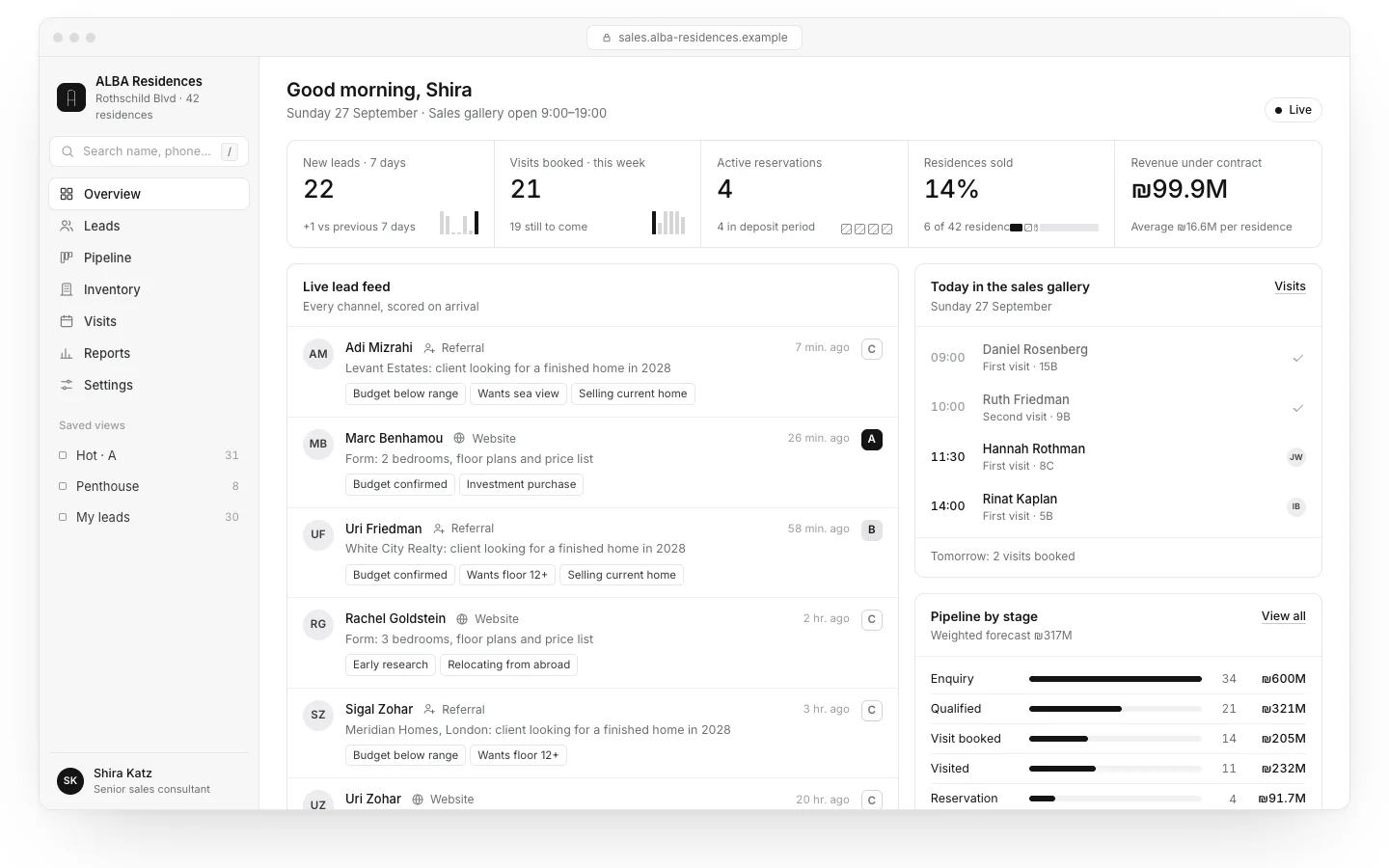
A real estate developer CRM has to know something an ordinary sales CRM does not: the product is a finite inventory of units, and each unit can go to exactly one buyer. So the foundation is not a list of leads but a tree of project, building, floor and unit, where every unit carries a status and a price, and every lead, visit and offer is tied to the units being discussed. Lead sources, the sales office’s day and the developer’s weekly reports are built on top of that.
The most important decision is the data model, and it comes before choosing software. Sources, permissions and integrations follow, and only then the question of customising an off-the-shelf CRM or building one. A working example is the ALBA CRM, a residential tower we built as a concept. The business is fictional; the system works and you can open it.
Why a generic sales CRM struggles with new development
Most CRMs were designed for products that can be sold again and again: subscriptions, services, packages. New development sales are the opposite. There is a fixed number of units, each different in floor, orientation, size and price, and once a unit is sold it leaves the inventory. A system that does not model this pushes the sales team into a separate spreadsheet for inventory, and that is where mistakes start.
- Finite inventory. The same unit cannot be offered to two buyers at once. The system has to lock it, not just record a note.
- Long cycles. Months can pass between the first enquiry and the signature. You need the full history of calls, visits and offers, not just the latest status.
- Several decision makers. A couple, parents helping with financing, sometimes a lawyer or mortgage adviser. One lead is really a family.
- Brokers. Some buyers arrive through brokers, and you need a clear record of who introduced whom to avoid commission disputes.
- Changing price lists. Developers revise prices by phase and sales progress. An offer sent a month ago must stay linked to the price list that applied then.
The data model: project, building, floor, unit
Agree on the data model before discussing screens. It is the hardest thing to change later, and every report depends on it.
| Entity | What it holds | Practical note |
|---|---|---|
| Project | Name, address, phase (planning, permit, construction, handover), active price list | A developer with several projects should see all of them in one system, clearly separated |
| Building and floor | Number, floor count, position on site | Enables filtering and a visual stacking plan |
| Unit | Number, rooms, area, balcony, orientation, parking and storage, price, status | Statuses: available, held, reserved, under contract, sold |
| Price list version | Start date, price per unit, who approved it | Every offer is stored with the version it was based on |
| Lead | Source, date, pipeline stage, assigned salesperson | The source is set once and never overwritten |
| Contact | Name, phone, email, relation to the lead (partner, parent, lawyer) | Several contacts per lead |
| Visit | Date, attendees, units viewed, notes | Linked to the office calendar |
| Offer | Unit, price, price list version, expiry, status | An active offer moves the unit to held |
The difference between held and reserved matters. Held is a temporary hold, say 48 or 72 hours, while the buyer checks financing. Reserved means a reservation agreement has been signed or a deposit paid. The system should release expired holds automatically and notify the salesperson; otherwise units sit blocked without anyone noticing.

Lead sources and attribution
A developer needs to know not only how many leads came in, but which channels produced the leads that eventually signed. That decides where marketing budget goes. Typical sources in real estate lead management:
- Landing page form. The ALBA launch page sends every enquiry straight into the CRM with the campaign’s UTM parameters. We cover what makes such a page work in a landing page that converts.
- Phone agent. An AI phone agent answers inbound calls, including evenings and weekends, and logs a summary, requirements (rooms, floor, budget) and a visit slot. More in AI phone agent.
- WhatsApp. Enquiries open a lead with the full conversation attached.
- Brokers. A broker registers a client through a dedicated form or portal, and the registration is time-stamped.
- Walk-ins. The salesperson opens a lead on the office tablet, with one required field: how did you hear about us.
Two rules make the difference. First, the original source is kept and never overwritten: if someone filled in a campaign form and later called, the source stays the campaign and the call is logged as activity. Second, duplicates are matched on phone and email and merged, so one family does not appear as three leads with three salespeople.

The sales office’s day
A good system is measured by whether salespeople open it in the morning because they want to. So the first screen should answer what needs doing today, not show a general dashboard.
- Visits calendar. Who is coming today, at what time, which units they asked to see, and what was said last time.
- Open follow-ups. Leads without a reply, offers about to expire, holds ending today.
- Automatic reminders. A visit creates a follow-up task; if it is not done, the system reminds the salesperson and then alerts the sales manager.
- Fast logging. After a visit, adding notes and marking favourite units should take under a minute, on a phone too.
- Sending materials. Floor plans, specifications and renders go out from the lead record, so there is a log of what was sent and when. 3D renders and plans fit well here; see real estate 3D visualisation.
Inventory view: who holds what, and no double-selling
The inventory view is the core of a CRM for new development sales. Usually it is a grid or building section, floor against unit, with a mark for each status. Clicking a unit shows its price in the active price list, the leads who asked about it, and who is holding it and until when.
The mechanism that prevents double-selling is simple. A unit can move to held or reserved only when it is available, and two salespeople cannot hold the same unit at the same moment. The second attempt is blocked and the system shows who holds it and until when. That is exactly where a shared spreadsheet fails.
A system that does not know a unit can be sold only once is a phone list, not a real estate CRM.
Weekly reports for the developer
The developer does not need every call. They need one consistent picture each week that can be compared with the week before. We do not give target numbers, because they depend on the project, location and phase, but these are the reports worth having:
- Pipeline by stage: how many leads sit at each stage (new, contacted, visited, offered, negotiating, signed) and how many moved this week.
- Units by status: available, held, reserved, under contract, sold, by building and unit type. It quickly shows which unit type is slow.
- Source quality: for each source, how many leads, visits, offers and signatures. A channel with many leads and few visits is a reason to look at the campaign or the page.
- Response time: how long from first enquiry to the first reply.
- Expired offers: offers that lapsed, with the reason where one was recorded.
The report can arrive by email every Monday morning, as a file or a dashboard link. In the ALBA example the dashboard shows pipeline, inventory and source quality on one screen.

Integrations and permissions
A developer CRM is only as good as the data that flows into it without anyone typing. These are the integrations we plan in almost every project:
- Website and landing page forms, with UTM and source.
- The phone agent: call summary, requirements, and a recording or transcript according to configuration and the caller’s consent.
- WhatsApp Business: opening a lead and attaching the conversation.
- Email and calendar: visit invitations and reminders.
- E-signature for reservation forms and agreements.
- Accounting: recording deposits and payments without double entry.
Permissions matter just as much. A broker sees only the leads they registered and the unit statuses, never other buyers’ details. A salesperson sees their own leads and the full inventory. The sales manager and the developer see everything, including reports. Changing a price list is restricted to one role and recorded in an audit log.

Customised off-the-shelf CRM or custom-built
There is no single answer. Well-known CRMs can be adapted to real estate with custom fields, custom objects and add-ons, and that suits many developers. A custom system makes sense when the inventory model, permissions or integrations do not fit comfortably.
| Consideration | Customised off-the-shelf | Custom-built |
|---|---|---|
| Time to go live | Faster; the base exists | Longer; the data model and screens are built |
| Inventory model | Units as a custom object; locking against double-selling needs extra work | Built around project, building, floor and unit from the start |
| Running cost | Per-seat licences that grow with the team | Hosting and maintenance; no per-seat fee |
| Broker access | Depends on the plan; sometimes extra licences | Exactly as needed |
| Integrations | Whatever the marketplace offers, development beyond that | Each one is built, but exactly as required |
| Data ownership | With the vendor, with export | With you |
What sets the scope: number of projects, number of users, how many integrations are needed, and whether a broker or buyer portal is required. In our apps and admin systems service we start from the model described here and check with you what is missing.
To see it working, open the ALBA CRM and the phone agent that feeds it. When you want a system like this for your project, send a brief and you will get a written direction, price and date by email.
No term matches.
Questions
How is a real estate developer CRM different from a regular sales CRM?
It manages a finite inventory of units, each with a status and price, where each unit can be sold only once. A regular CRM tracks leads and deals without that inventory.
Which statuses should each unit have?
Available, held, reserved, under contract and sold. Temporary holds should release automatically when they expire, with a notification to the salesperson.
How does the CRM prevent selling the same unit twice?
A unit can be held only when it is available, and a parallel hold by another salesperson is blocked, with the system showing who holds it and until when.
Can brokers work in the same system?
Yes, with restricted access: a broker sees only the leads they registered and unit statuses, not other buyers’ details. Registrations are time-stamped.
Which lead sources can be connected?
Website and landing page forms with UTM, an AI phone agent, WhatsApp, broker registrations and walk-ins. The original source is kept and never overwritten.
Should a developer customise an off-the-shelf CRM or build one?
A customised off-the-shelf CRM goes live faster. A custom build makes sense when the inventory model, broker permissions or integrations cannot fit without compromises.
Getting started
Want this for your business?
Send a short brief: three required questions, the rest only if you like. We reply by email with a direction, a written price and a date.